Get started
From install to live data in minutes
Install a node, sign in, subscribe to a feed, then publish your own. Each step shows the screen you will see; the highlighted control is the one to click.
Install and open
Get the desktop app, or install from a terminal. A node starts on your machine and its dashboard opens.
curl -fsSL https://spacedatanetwork.org/install.sh | bash
spacedatanetwork start
spacedatanetwork openirm https://spacedatanetwork.org/install.ps1 | iex
spacedatanetwork start
spacedatanetwork openThe dashboard lives at http://127.0.0.1:5001/. The icons on the left switch between This node, Nodes and Store.
Installing on a server, or in Docker? Bare metal or Docker covers the service, the configuration and the ports, and full nodes and NAT nodes explains what changes when other computers can reach yours.
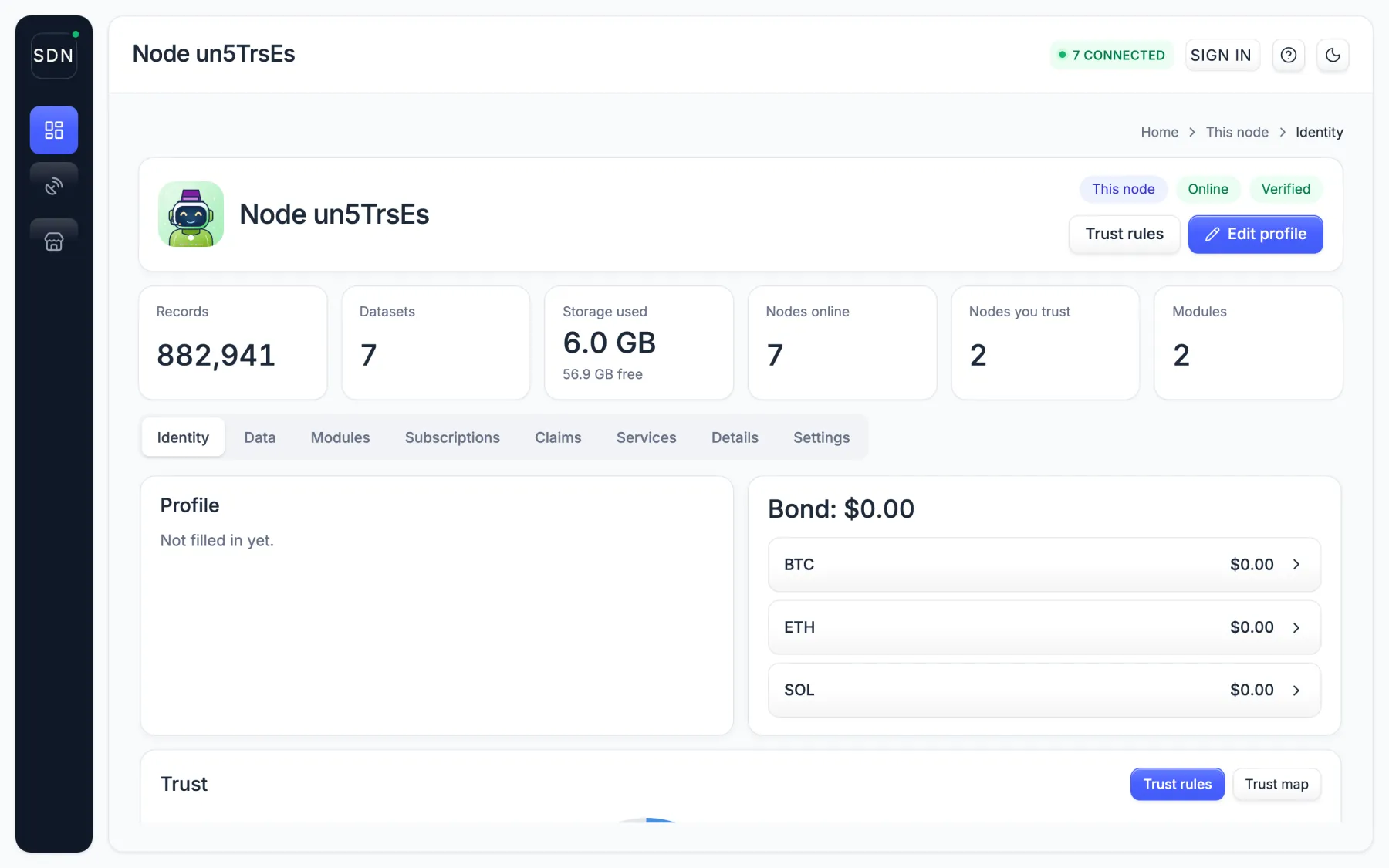
Sign in as the owner
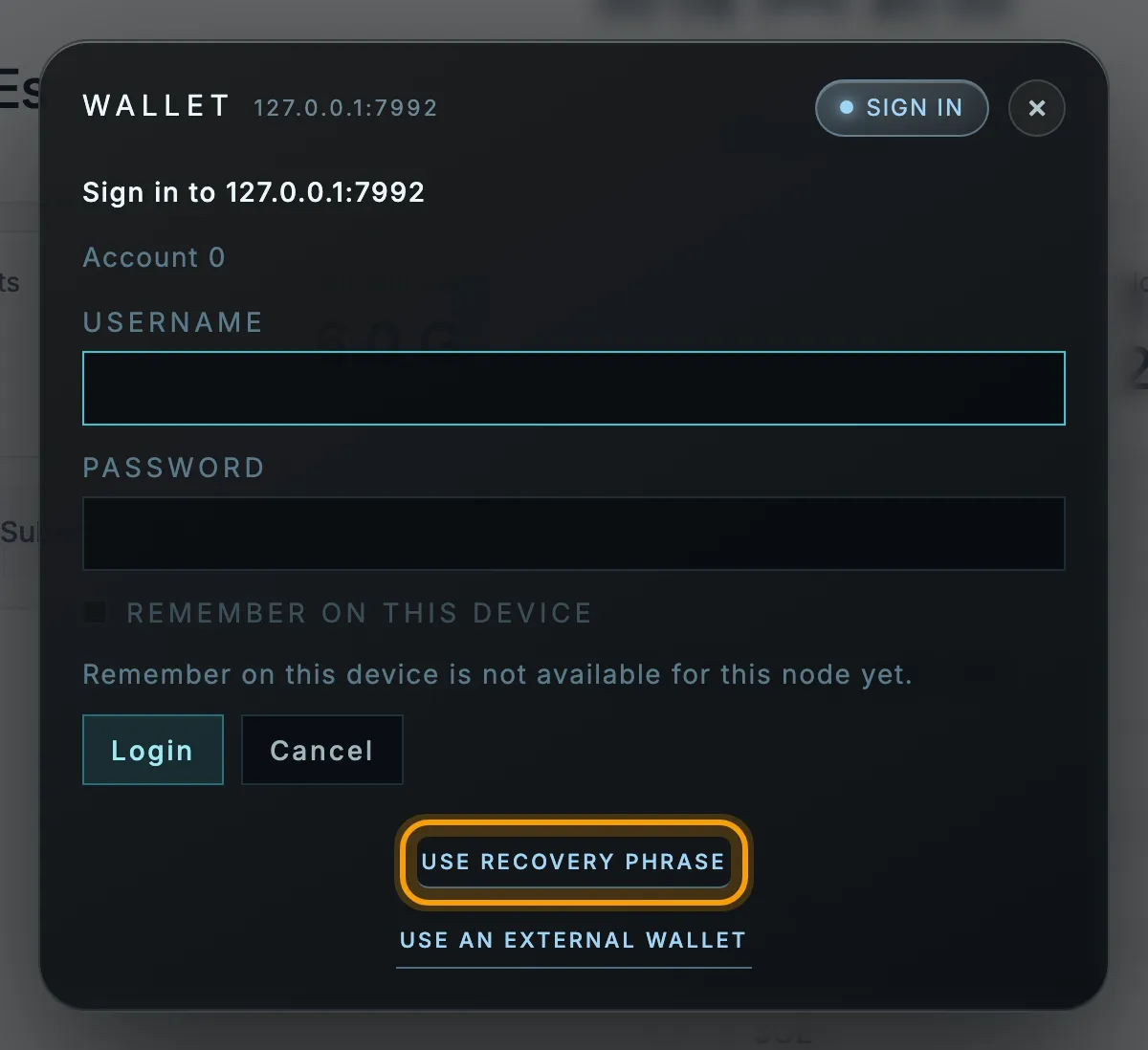
The first start created your node's ID. Its recovery phrase is the owner's key.
- Reveal the phrase: in the desktop app, Node → Show recovery phrase; in a terminal,
spacedatanetwork show-identity --show-mnemonic. - Click Sign in, then Use recovery phrase.
Write the phrase down and keep it offline. It rebuilds your ID on a new machine, and anyone who has it can act as you. There is no account or password to register.
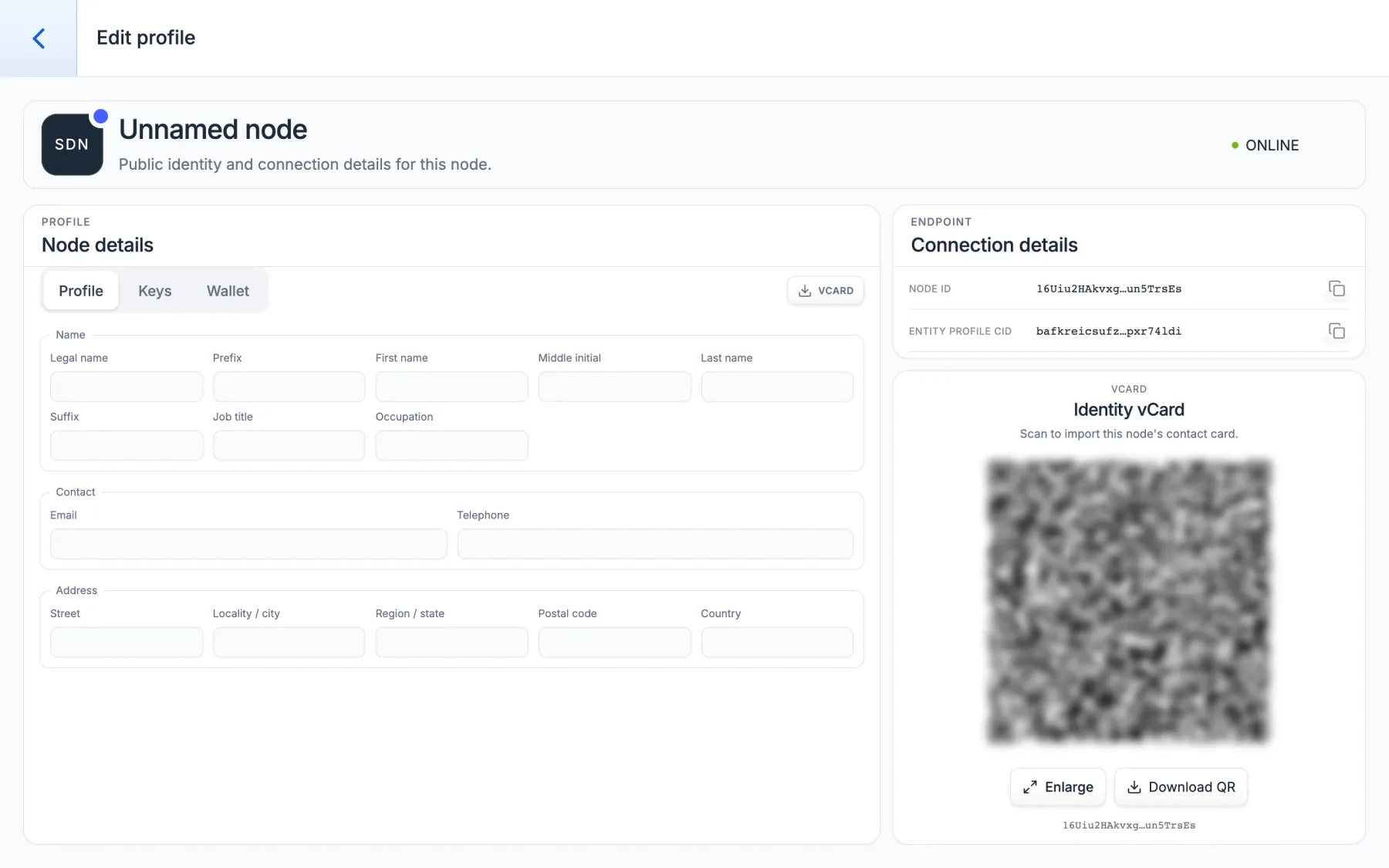
Fill in your profile
Click Edit profile and add your organization and contact details. This becomes your digitally signed public listing, so others can find you and check that your data is really yours.
Share it as a contact card: the VCARD button or the QR code carries your details plus the proof that they are genuine.
Find data
Open Store → Data. Each listing shows the data type, who publishes it and how many records it holds. Open data is free.
Listings marked On another node can be subscribed to. Use Search to filter by type or provider.
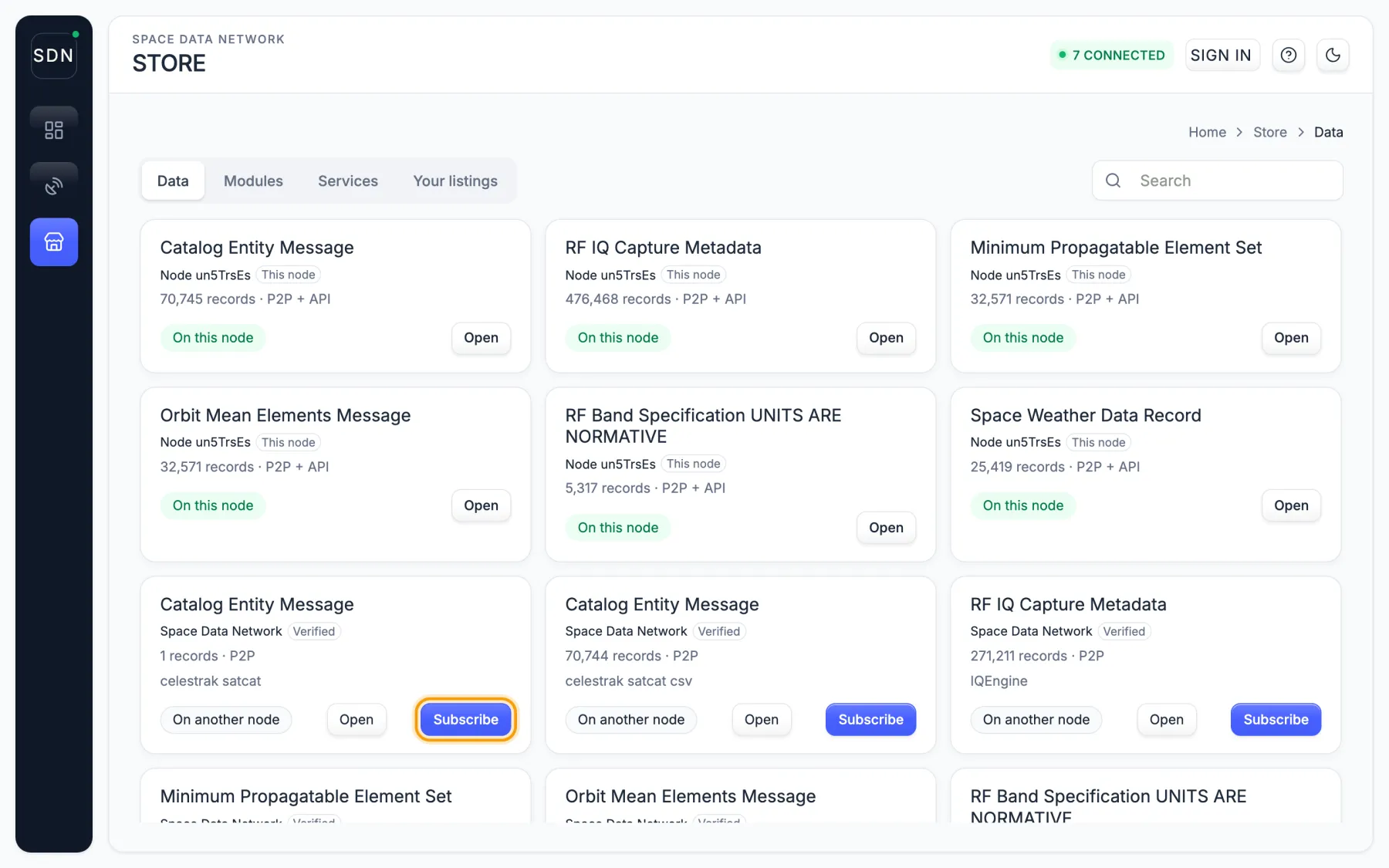
Subscribe
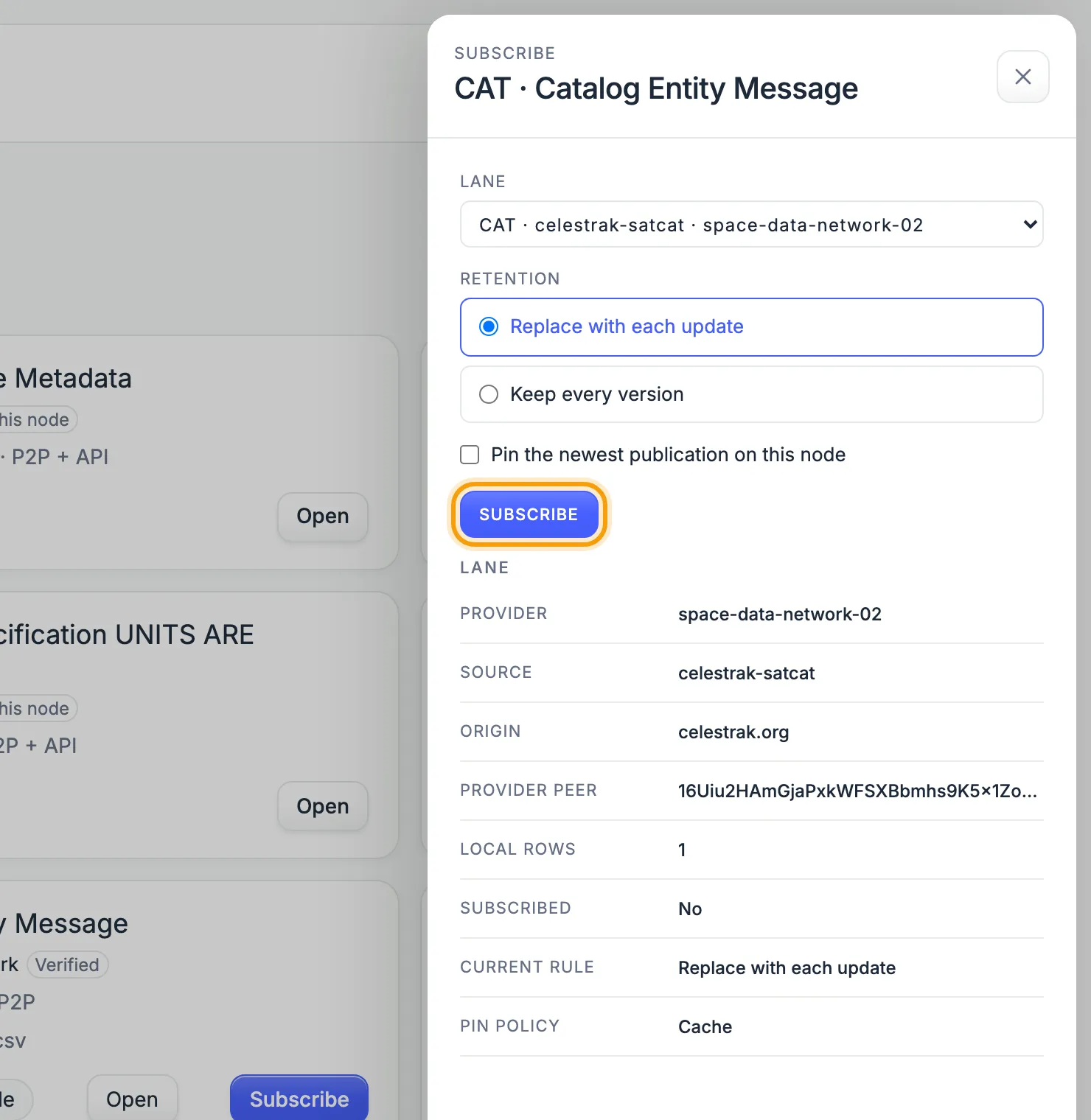
Click Subscribe on a listing, choose what to keep, and confirm.
- Replace with each update keeps the latest version only.
- Keep every version keeps the history.
- Pin also stores the newest publication on your node.
New records stream in as they are published. Each one is checked against its publisher's signature before it is stored.
See what you hold
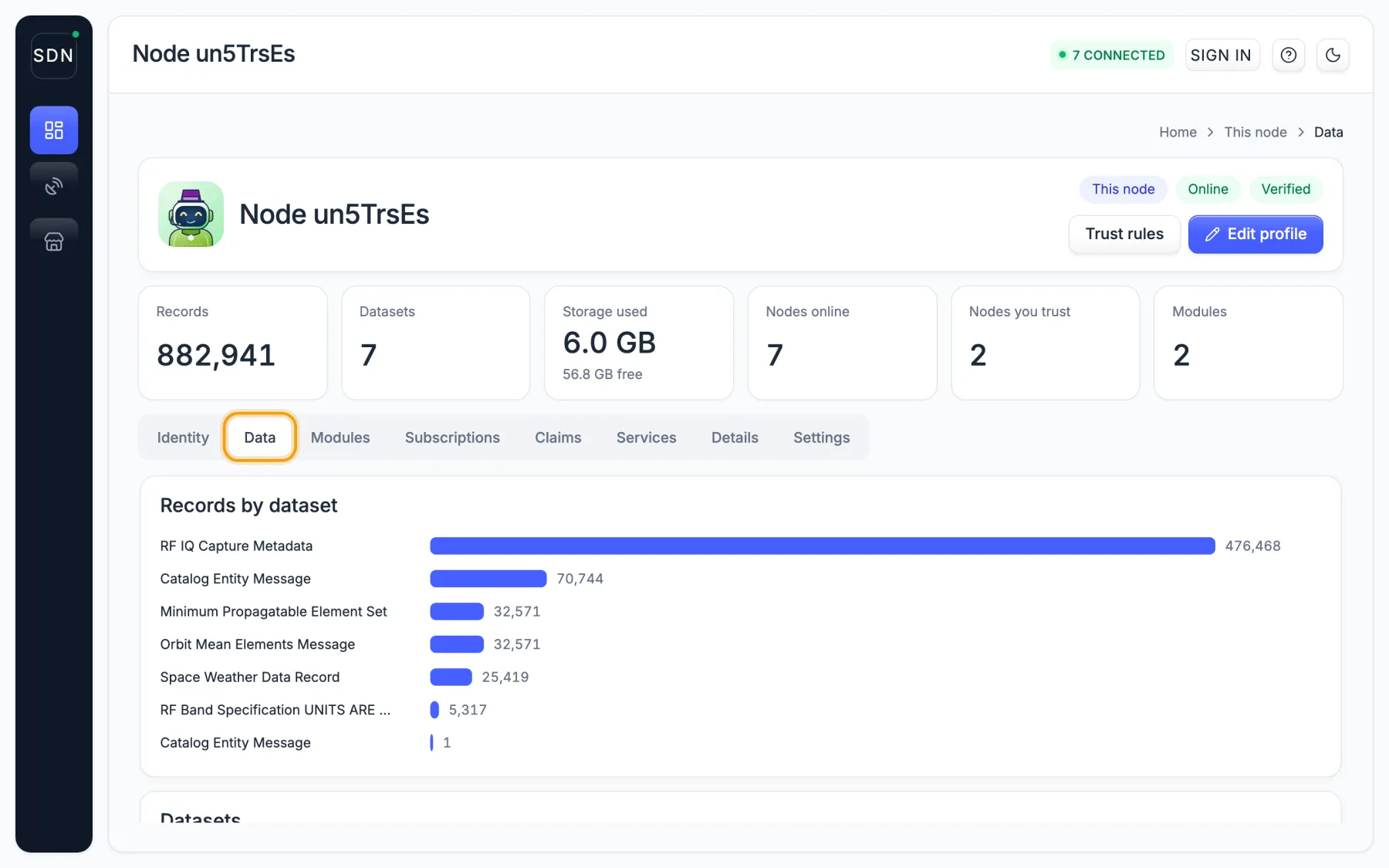
This node → Data shows every dataset on your node and how many records each has.
Your own software reads the same data from the node's local API, or from a terminal: spacedatanetwork search data --schema OMM --format csv.
Publish your own
Signed in as the owner, open Subscriptions and click Publish a stream. Pick a standard format (orbits are OMM, ephemerides OEM, conjunctions CDM, catalogs CAT) and list it.
Every record you publish carries a digital signature from your ID, so anyone can confirm it came from you, unaltered. From code it is one call:
import { SDNNode } from '@spacedatanetwork/sdn-js';
const node = new SDNNode();
await node.start();
await node.publish('OMM', ommData);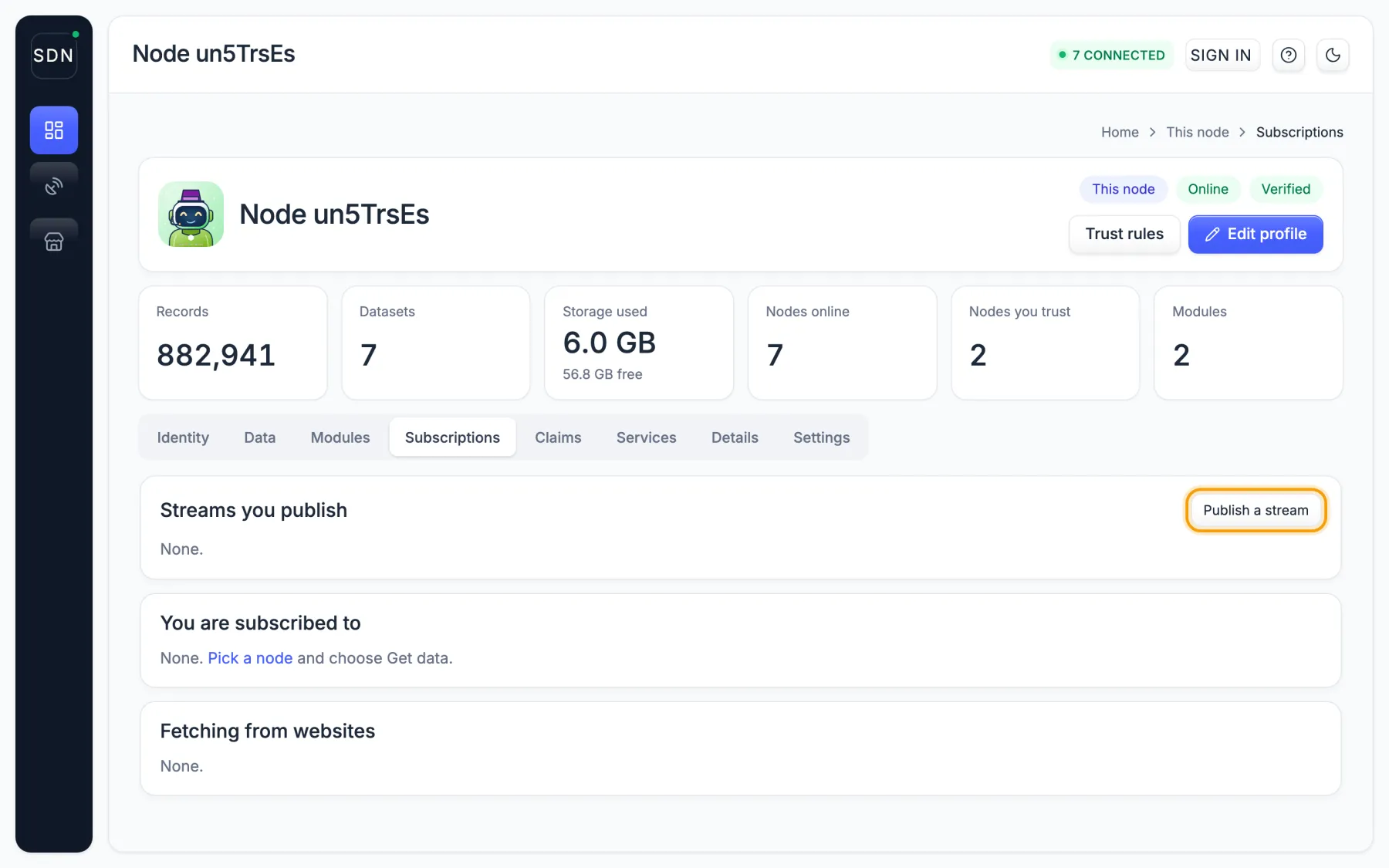
Explore the network
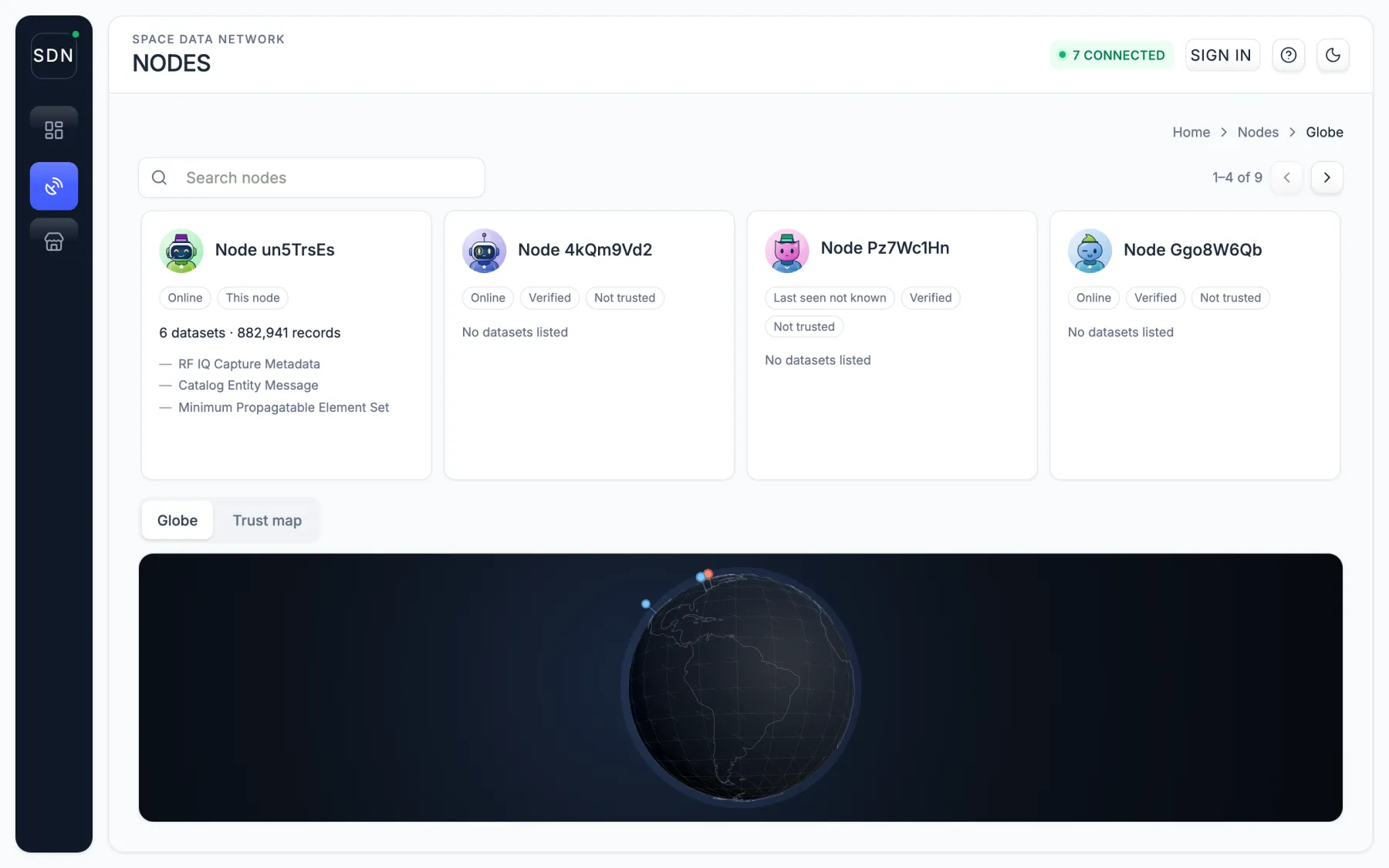
Nodes lists every node your node knows: whether it is online, whether its profile is verified, and what it publishes. The globe and trust map show where they are and who trusts whom.
Mark the nodes you rely on as trusted with Trust rules on the This node screen.
Install a node
Bare metal or Docker
A node is one program, spacedatanetwork. You can run it directly on a computer you control (“bare metal”: a server, a virtual machine or a desktop, with no container around it) or inside Docker. Both run the same node, join the same network and keep the same kind of identity. Pick the one that fits how you already run software.
| Bare metal | Docker | |
|---|---|---|
| Platforms | macOS (Apple Silicon and Intel), Linux (x86-64 and ARM64), Windows (x86-64) | Linux x86-64 image on Docker Hub; an ARM64 image archive for docker load on the release page |
| How it keeps running | A background service for your user account, installed by spacedatanetwork start | The container, with --restart unless-stopped |
| Where its files live | ~/.spacedatanetwork/: config.yaml, the data and the keys | One volume mounted at /app/data: the data, the keys and the sign-in records |
| Updates | Digitally signed updates (spacedatanetwork update check) on Linux x86-64; elsewhere, run the installer again | Run a newer image tag with the same volume and the same hostname |
Bare metal: download and install
The installer finds the newest node release on GitHub, downloads the bundle for your system, checks it against the release’s published checksums, unpacks it under ~/.spacedatanetwork/bundles, puts the spacedatanetwork command (and its short name, sdn) in ~/.spacedatanetwork/bin, and creates the node’s identity. It needs no administrator rights.
curl -fsSL https://spacedatanetwork.org/install.sh | bashirm https://spacedatanetwork.org/install.ps1 | iex- If the installer says
~/.spacedatanetwork/binis not on yourPATH, add it:export PATH="$HOME/.spacedatanetwork/bin:$PATH". - To install a particular release instead of the newest, set
SDN_VERSION, for exampleSDN_VERSION=v1.0.5-beta.70.SDN_INSTALL_DIRandSDN_BUNDLE_DIRmove the command links and the bundles. - The installer runs the node once before it reports success. On a Linux system too old for the build (its C library, glibc, is older than the one the node was built against) it says so, leaves nothing running, and points you to the Docker image instead.
- The same bundles (
spacedatanetwork-<version>-<system>-<cpu>.tar.gz,.zipfor Windows) andspacedatanetwork-checksums.txtare on every release page; the download section links the current ones.
First run
spacedatanetwork start     # install and start the background service
spacedatanetwork status    # is the node up?
spacedatanetwork open      # print the dashboard address, http://127.0.0.1:5001/
For a session in the foreground instead, with the log in your terminal, run spacedatanetwork daemon. Run the node as an ordinary user, never as root.
The background service
spacedatanetwork start installs a service for the user who runs it and starts it; the service restarts the node if it stops.
| System | Service | File |
|---|---|---|
| Linux | systemd user service spacedatanetwork.service | ~/.config/systemd/user/spacedatanetwork.service |
| macOS | launchd agent org.spacedatanetwork.daemon | ~/Library/LaunchAgents/org.spacedatanetwork.daemon.plist |
| Windows | Scheduled task SpaceDataNetworkDaemon |
spacedatanetwork stop                # stop and disable the service
spacedatanetwork restart
spacedatanetwork service status      # the operating system's view of the service
spacedatanetwork service uninstall   # remove the service
spacedatanetwork remove              # remove this install; keeps the identity and data
                                     # (add --purge-data to delete those too)
On a Linux server you log out of, a user service stops with your last session unless systemd keeps the user’s services running. That is a systemd setting, not a node setting: sudo loginctl enable-linger $USER. Read the node’s log with journalctl --user -u spacedatanetwork -f.
Configuration and keys
The first run writes the configuration to ~/.spacedatanetwork/config.yaml; the records go to ~/.spacedatanetwork/data and the keys beside them in ~/.spacedatanetwork/keys. Every command takes --config <file> (or the SDN_CONFIG variable) to use another file. The settings to check before you open the node to the internet are listed in INSTALL.md: where the records are stored and how much space they may use, and keeping the dashboard on this computer only (127.0.0.1:5001) unless it has TLS and sign-in turned on.
The node’s identity is a recovery phrase sealed to this computer. Export a backup once and keep it somewhere other than this computer: spacedatanetwork key export --format backup.
Ports
| Port | Protocol | What it is for |
|---|---|---|
| 4001 | TCP and UDP (QUIC) | Connections between nodes |
| 8080 | TCP (WebSocket) | Web browsers connecting to the node |
| 4003 | UDP (WebRTC-direct) | Web browsers connecting to the node |
| 5001 | TCP, this computer only | The dashboard and the local API |
No port has to be open for the node to work. Opening 4001, 8080 and 4003 to incoming connections is what makes it a full node; see full nodes and NAT nodes below.
Linux packages
Each release also carries Debian and RPM packages for Linux x86-64 (spacedatanetwork-full_<version>_amd64.deb and spacedatanetwork-full-<version>-1.x86_64.rpm; the version is written with dots, such as 1.0.5.beta.70). They install the node under /opt/spacedatanetwork, a configuration at /etc/spacedatanetwork/config.yaml that keeps records under /var/lib/spacedatanetwork, and a system-wide service, /etc/systemd/system/spacedatanetwork.service, that runs as a user named sdn. The packages create neither that user nor /var/lib/spacedatanetwork, so create both before starting the service. For a single server, the installer above is simpler.
Docker
The image is dockerdigitalarsenal/space-data-network, tagged by release (v1.0.5-beta.70) and with a moving beta tag for the newest beta. It carries the node, its storage engine, IPFS (Kubo) and the sign-in pages, and runs as an ordinary user inside the container.
docker run -d --name sdn --hostname sdn --restart unless-stopped \
  -v sdn-data:/app/data \
  -p 127.0.0.1:5001:5001 -p 4001:4001 -p 4001:4001/udp \
dockerdigitalarsenal/space-data-network:v1.0.5-beta.70services:
sdn:
image: dockerdigitalarsenal/space-data-network:v1.0.5-beta.70
container_name: sdn
hostname: sdn
restart: unless-stopped
ports:
- "127.0.0.1:5001:5001"
- "4001:4001"
- "4001:4001/udp"
volumes:
- sdn-data:/app/data
volumes:
sdn-data:- The volume. Everything the node owns is in
/app/data: records, keys and sign-in records. Keep the volume and you keep the node. - The hostname is required. Unless you give the node a key password, it seals its keys with a password derived from the container’s hostname, and Docker invents a new hostname every time a container is created. A first start without
--hostnamerefuses and prints what to do. Any fixed name works; it is not a secret. To use a password instead, mount a file and pointSDN_KEY_PASSWORD_FILEat it. - Ports. The command keeps the dashboard on this computer (
127.0.0.1:5001) and opens 4001 for other nodes. For a full node that browsers can reach too, also publish-p 8080:8080 -p 4003:4003/udp. - First start is slower. The node compiles its storage engine for this computer’s processor and keeps the result in the volume.
- Dashboard:
http://127.0.0.1:5001/. The recovery phrase:docker exec sdn /app/spacedatanetwork show-identity --config /app/config/full-docker.yaml --show-mnemonic. - Your own configuration. The image starts with
daemon --config /app/config/full-docker.yaml. Mount your own file and passdaemon --config <file>as the command to replace it. - No Docker Hub? Every release carries the image as an archive for
docker load, for examplespacedatanetwork-container-1.0.5.beta.70-linux-amd64.tar.gz(the version is written with dots).
Full nodes and NAT nodes
Can other nodes reach yours?
Every node runs the same software. What differs is whether other computers on the internet can open a connection to it. That depends on your network, not on a setting you have to choose: the node checks for itself and adjusts.
NAT (network address translation) is how most home and office routers share one public internet address among many computers. Computers behind it can connect out, but nothing outside can connect in unless the router forwards a port to them. Many mobile and some home internet providers add a second layer of it (carrier-grade NAT), and company firewalls often block incoming connections the same way.
- A full node is publicly reachable: any node can connect to it directly.
- A NAT node sits behind NAT or a firewall. It connects out to other nodes, and they reach it through those connections or through a relay.
- A relay is a full node that passes traffic between two nodes that cannot connect to each other directly.
How a node finds out
Shortly after it starts, the node asks nodes it has connected to whether they can connect back to it (a check called AutoNAT). While the answer is yes, it acts as a full node. While it is no, it acts as a NAT node and tries, on its own, to become reachable:
- it asks the router to forward its ports (UPnP or NAT-PMP, where the router allows it), and asks again if the router restarts and forgets;
- it books a place on a relay, so others can reach it through the relay;
- when another node connects through a relay, the two try to open a direct connection through both routers at the same moment (hole punching), which often works.
What each can do
| Full node | NAT node | |
|---|---|---|
| Subscribe to data, keep records, use the dashboard and the local API | Yes | Yes |
| Publish records to the network | Yes | Yes, over the connections it opens |
| Other nodes connect to it | Directly | Through a relay, or directly once hole punching works |
| Serve large published datasets and archives to other nodes | Yes | Only over a direct connection. A relayed connection carries about 128 KiB for about two minutes, so a node that is reachable only through a relay can be found but cannot deliver a large dataset. |
| Relay for NAT nodes | Yes, automatically, with limits: 32 bookings in all, 8 relayed connections per node, each booking for 30 minutes | No |
| Help other nodes find each other (serve the network’s shared directory, the DHT) | Yes, automatically | No: it looks others up, but answers no lookups, and other nodes leave it out of their copies of the directory |
| Web browsers connect to it directly | Yes, with ports 8080 and 4003 open | No |
Which to run
- A NAT node is fine for a laptop, a desktop or an office server that subscribes to data, analyses it and publishes small streams. There is nothing to set up.
- Run a full node to publish datasets other nodes download, to offer software and services, or to help carry the network: an always-on server with a public address and ports 4001 (TCP and UDP), 8080 (TCP) and 4003 (UDP) open to incoming connections, either directly, on a cloud server’s firewall, or forwarded by your router.
Settings
The defaults suit almost everyone. These three, in the network part of config.yaml, change the behavior:
network:
  enable_relay: auto   # auto: relay while reachable (default); always; never
  dht_server: auto     # auto: serve the directory while reachable (default); always; never
  announce: []         # extra public addresses to advertise, as multiaddrs
enable_relay: neverkeeps a reachable node from relaying for others; it can still reach others through relays.alwaysrelays whether or not the node is reachable.dht_servertakes the same three values.announceis for a node reached at an address it cannot see itself, such as a DNS name or a port your router or load balancer forwards, for example/dns4/node.example.org/tcp/4001.- Signed in as the operator,
GET /api/v1/status/reachabilityon the local API gives the node’s own answer:direct(a full node),relayed(a NAT node reachable through a relay),unconfirmedorunreachable.
Go further
From a terminal
# is the node up?
spacedatanetwork status
# fill in your public listing, then share it as a QR code
spacedatanetwork identity wizard
spacedatanetwork identity export --format qrcode
# data formats on the network, who publishes orbits, pull records
spacedatanetwork search standards OMM --format json
spacedatanetwork search providers celestrak --schema OMM
spacedatanetwork search data --schema OMM --format csv
# digitally signed software updates
spacedatanetwork update check
Build a module
Modules are digitally signed WebAssembly files. The same file runs in a browser, on a server or on an edge device, and can only touch what the node hands it.
npx space-data-module compile --manifest ./manifest.json --source ./src/module.c --out ./dist/isomorphic/module.wasm
npx space-data-module check   --manifest ./manifest.json --wasm ./dist/isomorphic/module.wasm
npx space-data-module sign    --wasm ./dist/isomorphic/module.wasm --key ./keypair.json
See the Module SDK.
Spec sheet for IT and security review
This is the short version of what a Space Data Network node is, what it runs, what it needs, and what it talks to — written for the people who approve software on your network. Everything here is the shipped default; every value can be changed in the node's configuration file.
Architecture in one paragraph
A node is one long-running process on one machine. It joins a peer-to-peer network (libp2p, the same networking stack as IPFS), receives and publishes small digitally signed records in the Space Data Standards formats (satellite orbits, catalog entries, conjunction warnings, space weather, and so on), stores them on local disk, and serves them to your own software over a local HTTP API and a browser dashboard. Optional analysis modules run inside a WebAssembly sandbox in the same process. There is no central server: your node talks to other nodes directly, and every record carries the publisher's signature, so provenance is verified rather than assumed.
Software components
| Component | What it is | Runs as |
|---|---|---|
| Node daemon | Single Go binary spacedatanetwork: libp2p host, record store, HTTP API, dashboard, module runtime. Statically linked; no external database, no interpreter. | One background service (systemd, launchd, or the Docker container) |
| Record store (FlatSQL) | A SQL engine compiled to WebAssembly that indexes the FlatBuffer records in place. Append-only stream files under the node's data directory; no SQLite, no Postgres. | In-process, via the WasmEdge runtime bundled with the binary |
| Kubo (IPFS) | Content-addressed storage for larger published assets and archives. Bound to loopback only; it never fetches arbitrary content for outside callers. | Managed child process of the daemon (bundled), or an existing Kubo you already run |
| Module runtime | Optional digitally signed WebAssembly modules and flows (analysis, ingestion). Each runs in a WASM sandbox with only the capabilities it declares (timer, HTTP egress, guarded persistence). | In-process, WasmEdge |
| Dashboard and API | Web dashboard and REST/WebSocket API on the admin listener. Sign-in is by cryptographic key; authentication is required by default. | Loopback listener 127.0.0.1:5001 |
| Desktop app (optional) | Same node wrapped in a desktop application with the dashboard as its window. | User application |
Hardware and platform
| Minimum | Recommended | |
|---|---|---|
| CPU | 2 vCPU, x86-64 or arm64 | 4 vCPU |
| Memory | 4 GB | 8 GB |
| Disk | 40 GB SSD (the node refuses writes under 5 GiB free) | 100 GB SSD or more, sized to the feeds you keep |
| Network | Any broadband; works behind NAT | A public IP if you want to relay for others |
| Operating system | Linux x86-64 or arm64, macOS Apple Silicon, or Docker (linux/amd64 image). Windows via the installer as it ships. Runs as an unprivileged user; never as root. | |
For reference, the public production nodes that serve the live catalog run on 2 vCPU / 8 GB virtual machines.
Ports
Inbound. None are required. A node behind a firewall or NAT still receives and publishes data through relays and hole punching. Opening the peer-to-peer ports makes the node directly reachable, which improves connectivity and lets it help other nodes.
| Port | Protocol | Purpose | Exposure |
|---|---|---|---|
| 4001 | TCP and UDP (QUIC) | libp2p peer connections | Optional inbound; recommended open |
| 8080 | TCP (WebSocket) | libp2p for browser peers | Optional inbound |
| 4003 | UDP (WebRTC-direct) | libp2p for browser peers | Optional inbound |
| 5001 | TCP (HTTP, WebSocket) | Admin API and dashboard | Loopback only by default. Bind it wider only with TLS and authentication on. |
| 443 / 80 | TCP (HTTPS) | Public dashboard and status feed with managed TLS (Let's Encrypt) | Only if you choose admin.tls_mode: managed |
| 5002 | TCP (HTTP) | Bundled Kubo RPC | Loopback only |
Outbound. The node initiates these connections; nothing else.
| Destination | Port | Why |
|---|---|---|
sdn.spaceaware.io | 443 TCP (WebSocket over TLS) | Bootstrap peer: first contact with the network, and the digitally signed software-update feed |
159.203.150.8, 167.172.219.213 | 4004 TCP, 4001 TCP | Bootstrap peers (the two public production nodes) |
| Other network peers | 4001 TCP/UDP typically; peers may listen on other ports | Peer-to-peer data exchange and the public Kademlia DHT used for discovery |
spacedatanetwork.org | 443 TCP | Installer and documentation only |
Data sources you enable (for example celestrak.org, space-track.org) | 443 TCP | Only if you turn on an ingestion module for that source; off by default |
A minimal egress rule set is therefore: TCP 443 to the hosts above, and TCP/UDP 4001 to the internet for peer traffic. The node sends no telemetry, crash reports, or usage data anywhere.
Communication protocols
- Transport: libp2p over TCP, QUIC, WebSocket, and WebRTC-direct. Every peer connection is encrypted and mutually authenticated with libp2p TLS or Noise; a peer's identity is its Ed25519 public key.
- Discovery and routing: the public Kademlia DHT (the same one IPFS uses), tagged so nodes find other Space Data Network nodes; AutoNAT, hole punching, and circuit relay v2 for nodes behind NAT.
- Data distribution: GossipSub publish/subscribe topics per data type, plus content-addressed fetch of published record sets by SHA-256.
- Wire format: Space Data Standards FlatBuffers, size-prefixed. The same bytes travel the network, sit on disk, and come back out of the API; JSON is offered on HTTP responses.
- Local API: HTTP/1.1 and WebSocket on the admin listener; the served reference is at
/api/v1/docson any running node. - Signatures and keys: every record carries its publisher’s Ed25519 digital signature and is verified before it is stored. All of a node's keys derive from one BIP-39 mnemonic (SLIP-10, BIP-44 paths); the mnemonic is encrypted at rest with a machine-derived key and fails closed if the machine changes. Encrypted record types use X25519 key agreement.
- Software updates: digitally signed update manifests over the update feed; a node verifies the signature, upgrades in place, and can roll back. No update is applied unsigned.
What leaves your network, and what does not
- Published by default: the node's identity record (organization name and contact details you enter in the wizard, plus its public keys) and any data you explicitly publish.
- Never published: private keys, the recovery phrase, configuration, and any record type not on the anonymous-read list. Anonymous read is decided per data type and is closed unless deliberately opened; today it covers the public catalog lanes (orbits, catalog entries, ephemerides, space weather, RF bands, link status, publication and dataset manifests, identity records, application manifests, entity groups).
- Administration: the dashboard and API require sign-in with a key the node knows. The node's own key is always an administrator; other operators are added by public key. No passwords are stored.
Where each of these facts comes from
- INSTALL.md — installation, configuration keys, and the ports table.
- SERVER-OVERVIEW.md — the node's architecture: storage, identity, networking, modules.
- OPERATOR-ENROLLMENT.md and AGENT-API-GUIDE.md — operator trust levels and the full API surface.
- Source code — the node is open source; the defaults quoted above are in
sdn-server/internal/config.
Questions from a security review are welcome: open an issue on GitHub or reply to the person who sent you this link.
How the orbital catalog is built
The combined catalog keeps every provider's orbits as attributed records and selects among them with an explicit, reproducible policy that weighs the evidence behind each solution. Read the Evidence-Supported ASO Catalog whitepaper or its Markdown source.